Camtro
- 4.5
- Rating
- 500.00K
- Installs
- Free
- Price

 Analysis by App-foxy
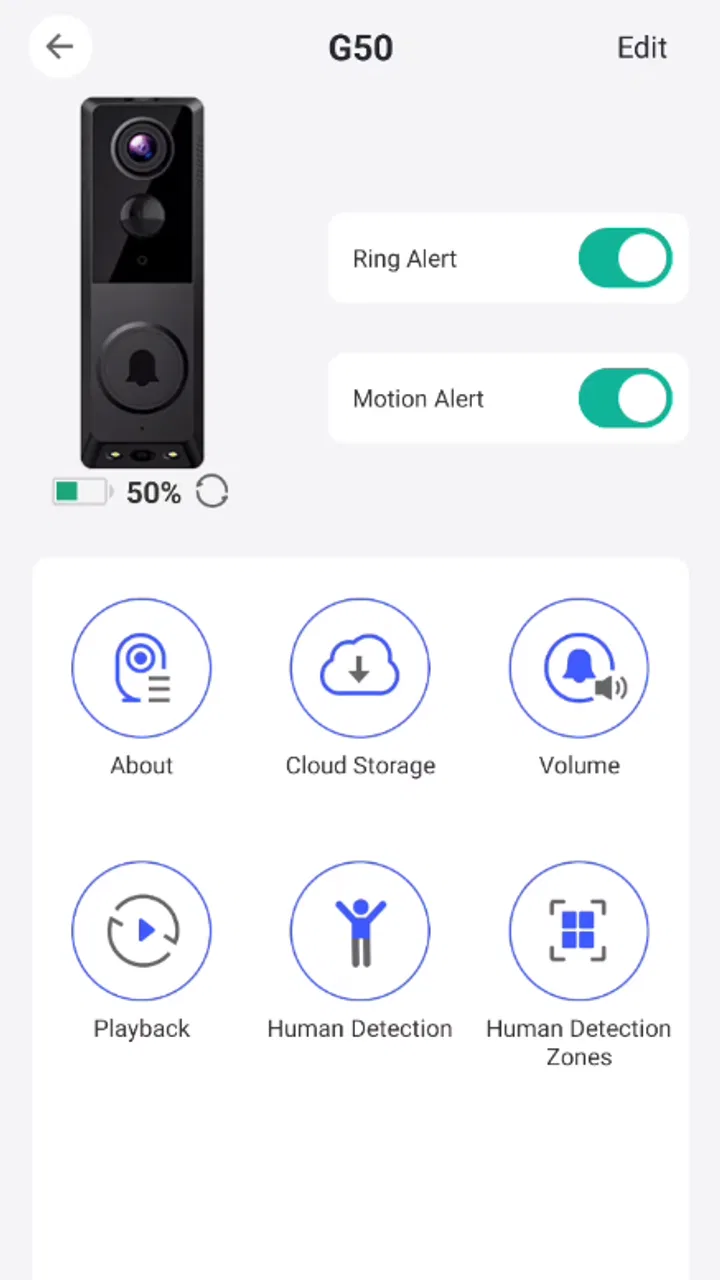
When I first looked at Camtro, I understood its appeal immediately: it is a tools app built around talking with visitors from a smartphone while seeing who is at the door. That makes it more practical than a basic audio-only intercom, especially when I am busy in another room, away from the entrance, or simply want visual context before deciding how to respond.
The idea is straightforward, but the value depends on how smoothly the first connection works and whether the app fits the way you actually receive visitors. I found Camtro most interesting for homes, small offices, reception areas, workshops, and similar spaces where a person may need to answer the door without standing beside it. It is not trying to replace every communication tool on a phone. Its purpose is narrower, and that focus is its main strength.
DigitalConverge Intellect Limited develops the app, which is available free of charge for users aged Everyone. It has reached over 500 thousand installs and holds a 4.5 average from around 18 thousand ratings, with roughly 1.7 thousand written reviews. Those figures suggest that the concept is easy for many people to understand, although the real experience still depends on your visitor setup and the devices involved.
You May Also Like

 Blood Strike: 2.5 Anniversary
Blood Strike’s Loadouts Turn Every Drop Into a Tactical Gamble
A close look at Blood Strike’s custom loadouts: how fast access to signature weapons reshapes its battle royale rhythm, rewards preparation, and narrows the gap between fights.

 Pandora - Music & Podcasts
Pandora’s Music Is Easy to Start, but Harder to Recover
Pandora’s strength is its low-effort path from a seed to a station. Its weak spot is how much confidence it asks you to place in connection, setup, and quiet recovery.

 8 Ball Pool
 Is Built on Rivalries, Rematches, and Routine
A close look at the rivalries, rematches, shared routines, and unanswered safety questions that turn a quick pool match into a persistent mobile community.

 Samsung Music
’s Quiet Strength Is Playing What You Already Own
Its reach comes less from spectacle than from dependable access to a personal library. That simplicity is both the app’s strongest retention engine and its ceiling.

 AccuWeather: Weather Radar
AccuWeather Review: A Quick, Clear Forecast for Everyday Decisions
For everyday plans, the best forecast is the one you can understand quickly. AccuWeather makes rain timing, radar, and local conditions easy to act on, with a few trade-offs.

 Hill Climb Racing
Why Hill Climb Racing Still Turns Crashes Into One More Run
A tiny car, a bumpy hill and one more upgrade: Hill Climb Racing keeps resurfacing because its simple chaos makes every near-miss feel personal.
More From Our News Desk



What to expect before you begin
The first thing to keep in mind is that Camtro is not simply a video-calling app with a different name. Its central scenario is a visitor at a designated point who needs to communicate with someone using a smartphone. That changes how I think about it: instead of starting a call with a contact, I am responding to an arrival or checking who is waiting.
This distinction matters because it sets a realistic expectation. Camtro can be useful when the visitor and the person answering are not in the same place, but it is not automatically a complete access-control system, security service, or replacement for every doorbell arrangement. I would treat it as a communication layer for visitor handling rather than assuming it manages every part of the entrance experience.
The app’s store summary focuses on two actions: speaking with visitors and seeing them. In everyday use, that combination is more useful than it sounds. Audio tells me what someone wants, while the visual element can help me understand whether the person is familiar, whether they are carrying something, or whether I need to move closer to the entrance before making a decision.
There is also a practical benefit for people who cannot stay near a doorway. A small business owner might be working in a back room, a resident might be preparing food, and a receptionist might be handling paperwork away from the front desk. In each case, the app can make the first response less dependent on physical proximity.
I would not install it expecting a general-purpose messenger. If your goal is to chat with friends, make group calls, or exchange files, a standard communication app will probably be a better match. Camtro makes more sense when the conversation begins with a visitor and the ability to see that visitor is part of the decision.
Preparing for the first setup
Before opening the app, I would decide where Camtro is going to be used and which phone should normally receive the visitor interaction. This simple decision prevents a common source of confusion: installing the app on a convenient phone without thinking about whether that device is the one someone will actually notice.
For a home, that might be the phone carried by the person most often available during the day. For a small workplace, it could be a shared device kept at reception or assigned to whoever handles arrivals. The best choice is not necessarily the newest phone; it is the one that will be nearby, charged, and easy to check when a visitor needs attention.
Once installed, I recommend moving through the setup slowly instead of tapping through every screen as quickly as possible. Read the labels around the visitor connection and make sure you understand which side of the interaction the phone represents. The app’s purpose is simple, but a misunderstanding at this stage can make a perfectly working setup appear broken later.
It is also worth testing in the same physical conditions in which you expect to use it. A test performed beside the entrance may feel successful, while the real situation involves a phone in another room, a closed door, or a noisy environment. I prefer to test from the actual working position because that reveals whether the app is genuinely convenient rather than merely functional.
The current release is version 2.0.3 and supports devices running Android 6.0 or later. That gives the app a broad compatibility range, but compatibility alone does not guarantee that every older phone will feel equally comfortable. On an aging device, I would pay attention to how quickly the app opens and whether switching between the conversation and other tasks remains manageable.
Making the first meaningful connection
The first successful action should be a controlled visitor test, not a real arrival. Ask someone you trust to act as the visitor while you stay in the position where you would normally answer. Have the visitor speak naturally, wait for your response, and move slightly rather than standing perfectly still. This helps you learn what the interaction feels like under ordinary conditions.
During that test, I would check three things. First, can I recognize that someone is trying to reach me without constantly watching the phone? Second, can I hear and answer comfortably? Third, does the visual part give me enough context to make the next decision? These questions are more useful than simply confirming that a screen opens.
A good first result is not just “the call connected.” It is knowing what you will do when the next visitor appears. Perhaps you will answer immediately, ask the person to wait, walk to the entrance, or explain that nobody is available. Practising that small routine makes the app feel like part of the household or workplace instead of an isolated installation.
One useful habit is to keep the first test short and repeat it from a different location. If you normally work upstairs, test upstairs. If the phone will sit behind a counter, place it there. The purpose is to discover whether your chosen arrangement supports quick decisions without forcing you to reorganize your day around the app.
I also suggest agreeing on a simple phrase with the test visitor, such as asking them to identify themselves and explain why they are there. That gives you a realistic way to judge whether the audio and video combination is helping. Seeing a person is valuable, but only when it improves the conversation and reduces uncertainty.
Where Camtro fits into an ordinary day
Imagine I am preparing lunch while expecting a delivery. I hear that someone has arrived, check the visitor interaction from my smartphone, and speak without leaving the kitchen immediately. If the person is at the wrong entrance, I can explain where to go. If I need to finish what I am doing, I can ask them to wait briefly. The useful result is not a dramatic feature; it is avoiding an unnecessary trip while still responding politely.
In a small office, the workflow could be different. A person working on stock might receive the visitor interaction while the usual front-desk position is unattended. The employee can identify the reason for the visit and decide whether to come forward. This is particularly helpful when the entrance cannot be watched continuously but visitors should not be ignored.
For a workshop or studio, the visual element may help distinguish a customer from a courier or a colleague. That does not mean the image should replace common sense. It simply gives the person answering more information before opening a door or interrupting a task.
My favourite use case is the one where the app saves attention rather than time. I do not need to monitor the entrance every minute, yet I can still respond when someone arrives. That is a small but meaningful improvement for people who work from home, manage a compact business, or have rooms where an ordinary doorbell is easy to miss.
Common confusion during the first few uses
The most likely misunderstanding is expecting Camtro to behave like a normal contact list. Its usefulness comes from the visitor context, so the important question is not only “who can I call?” but also “how is this visitor reaching the person responsible for answering?” If that relationship is unclear, the app may seem less useful than it really is.
Another point is the difference between seeing a visitor and knowing what to do next. The camera view can provide context, but it does not make a decision for me. I still need a sensible routine for unknown visitors, deliveries, service appointments, and people who arrive at the wrong time. I would avoid treating the visual feature as proof of identity.
It is also easy to test the app in an artificial way. Standing with both phones nearby can make the connection feel effortless, while the actual user may be several rooms away. Repeat the test with realistic distance and distractions. If the app is meant for a shared workplace, let the person who will really answer perform the test rather than leaving setup to the most technically confident employee.
Some users may also wonder whether the free download means every part of the experience is free. Camtro is free to install, while in-app purchases range from around nineteen dollars to one hundred dollars per item. I would review any purchase screen carefully and decide whether the available free experience already covers my intended visitor workflow before spending money.
That pricing structure is an important trade-off for households and small teams. If you only need occasional visitor communication, the free starting point may be enough to evaluate the idea. If your needs grow, compare the cost of optional purchases with simpler alternatives such as a conventional intercom or an existing device arrangement. The right choice depends on how often the app will be used and how much the visual visitor check matters to you.
How it compares with familiar alternatives
A traditional audio intercom is often simpler. It can be quick to answer, requires less attention, and may be preferable when the only question is whether someone is at the door. Camtro has an advantage when seeing the visitor changes the response, but that advantage is less important for people who rarely need visual information.
A standard video-call app offers more general communication features, but it usually requires the participants to behave like regular contacts and start a call intentionally. Camtro is more focused on the visitor scenario. I would choose the general app for conversations that begin between known people, and Camtro when the entrance or visitor point is the starting place.
A dedicated smart doorbell or camera system may offer a broader group of entrance-management tools, depending on the product. That could be a better direction for someone who wants a full home-security setup or a permanent recording workflow. Camtro is more appealing when the priority is direct conversation and immediate visual contact rather than building a larger monitoring system.
The trade-off is simplicity versus scope. Camtro’s narrow purpose can make it easier to understand, but users wanting extensive automation, multiple security devices, or a complete property-management system may outgrow it. I would not judge that as a flaw; it is simply a reason to match the app to the job instead of expecting one tool to cover every entrance need.
Small habits that make the experience better
My first practical tip is to create a response routine before relying on the app. Decide how you will handle a visitor when you are busy, when you do not recognize the person, and when the visitor needs directions. Having those responses ready prevents the conversation from becoming awkward and reduces the temptation to rush to the entrance without enough information.
My second tip is to test the phone’s everyday placement rather than leaving it wherever setup happened. A device hidden under papers or carried in a bag defeats the point of remote visitor communication. Pick a repeatable location or carrying habit that fits your day, then ask whether you can notice and answer promptly from there.
My third tip is to use the visual check as a prompt for better questions. Instead of immediately opening the door, ask the visitor to confirm their purpose or the name of the person they came to see. The picture and the conversation work best together. Neither should be treated as a substitute for sensible judgement.
A fourth useful insight is to separate technical success from operational success. A connection can work perfectly while the arrangement remains inconvenient because the wrong person receives it or the phone is rarely available. Review the whole path from arrival to response. If the process feels natural after a few tests, Camtro is doing its job; if not, changing the device location or assigned user may matter more than reinstalling the app.
Who should use it, and who should skip it
I would recommend Camtro to someone who regularly needs to answer visitors from away from an entrance and values seeing the person before deciding what to do. It is especially suitable for a home office, a compact business, a reception area without constant staffing, or any space where a visitor may arrive while the responsible person is occupied elsewhere.
It is also a sensible option for someone who wants to try a visitor-communication workflow without paying at the installation stage. The free entry point makes experimentation easier, and the Everyone age rating keeps the app broadly approachable for ordinary household use.
I would be more cautious if you only need a basic chime, if every visitor is already handled face to face, or if your main interest is advanced security monitoring. In those cases, a simpler intercom may create less friction, while a dedicated security product may offer a more suitable overall system. I would also skip Camtro if you do not have a clear person or phone responsible for answering.
People who dislike checking a smartphone during interruptions may prefer a conventional arrangement. Camtro adds flexibility, but that flexibility depends on the phone being available and the user being willing to respond through it. The app cannot turn an unattended device into a reliable reception desk.
My next-step recommendation
If you are curious, I would start with one clearly defined visitor scenario rather than trying to organize every possible use at once. Install the app on the phone that will genuinely be available, complete a short test with someone you trust, and repeat it from the place where you normally work. Then decide whether seeing and speaking with the visitor improves your response enough to keep the arrangement.
After that first test, write down the one or two situations in which Camtro saved you a trip or gave you useful context. If those situations happen regularly, the app has a clear role in your routine. If the test feels more complicated than simply walking to the door, that is valuable information too; a traditional option may suit you better.
The current version, 2.0.3, gives interested users a straightforward way to explore the concept on compatible Android phones. I like Camtro because it addresses a specific everyday annoyance without pretending to be a universal communication platform. Its strongest benefit is the combination of remote conversation and visual context, while its main limitation is that the surrounding routine still has to be organized by the user.
Overall, I see it as a practical tool for people who want to stay responsive without remaining beside an entrance. Use it when visitor communication is the problem you need to solve, not when you are looking for a general messenger or complete security system. With a realistic setup test and a clear answering routine, Camtro can become a useful part of a home or small workplace; without those basics, its focused design may feel narrower than expected.
FAQs for Camtro
01What is Camtro and what can I use it for?
Camtro is a camera-focused application designed to help users capture, edit, and manage photos or video content from a mobile device. Depending on the version available for your platform, it may include tools such as filters, image adjustments, creative effects, and sharing options. Before downloading, check the current app description and screenshots because features can vary between Android and iOS releases.
02Is Camtro free to download and use?
Camtro may be available as a free download, but some features could require in-app purchases, a subscription, or additional payments. Users should review the store listing carefully to identify premium editing tools, advertising, trial periods, and renewal conditions. If a free trial is offered, confirm its cancellation policy before starting it to avoid unexpected charges on your account.
03Does Camtro require access to my camera, photos, or other personal data?
Because Camtro is related to camera or visual content, it may request permission to use your device camera, microphone, photo library, or local storage. Grant only the permissions needed for the features you intend to use. It is also worth reading the privacy policy to understand whether images, usage information, or account details are stored locally, processed online, or shared with third-party services.
04Can I use Camtro without an internet connection?
Some basic camera functions may work offline, particularly if Camtro processes images directly on your device. However, internet access may be necessary for downloading effects, synchronizing content, signing in, displaying advertisements, using cloud backup, or sharing photos through online services. If offline use is important to you, test the main tools after installation and check whether any feature displays an online requirement.
05Is Camtro compatible with my Android or iPhone?
Compatibility depends on the specific Camtro release, your operating system version, and the capabilities of your device. Check the official Google Play or App Store listing before downloading to confirm supported versions, storage requirements, and whether your camera hardware meets the app’s needs. Older phones may experience slower processing, missing features, crashes, or reduced image quality compared with newer devices.
Pros
- Simple interface makes camera controls easy to find.
- Useful for quick snapshots without advanced setup.
- Lightweight design can save storage space.
- Fast access helps capture spontaneous moments.
- Suitable for users who prefer a straightforward camera app.
Cons
- Image quality may depend heavily on your phone’s camera hardware.
- Limited editing tools compared with full photo editors.
- Some features may require permissions that affect privacy.
- Advanced manual controls may be unavailable or restricted.
- Performance can vary across older Android and iOS devices.

Camtro
Gallery